Loading…

Features
Take control of sales, stock and business records
Every feature below works offline first and prices in KES. Screens shown are the real product — where a capture is not ready yet, the visual is labelled as illustrative.
Sales & checkout
Fast checkout that keeps ringing when the network drops
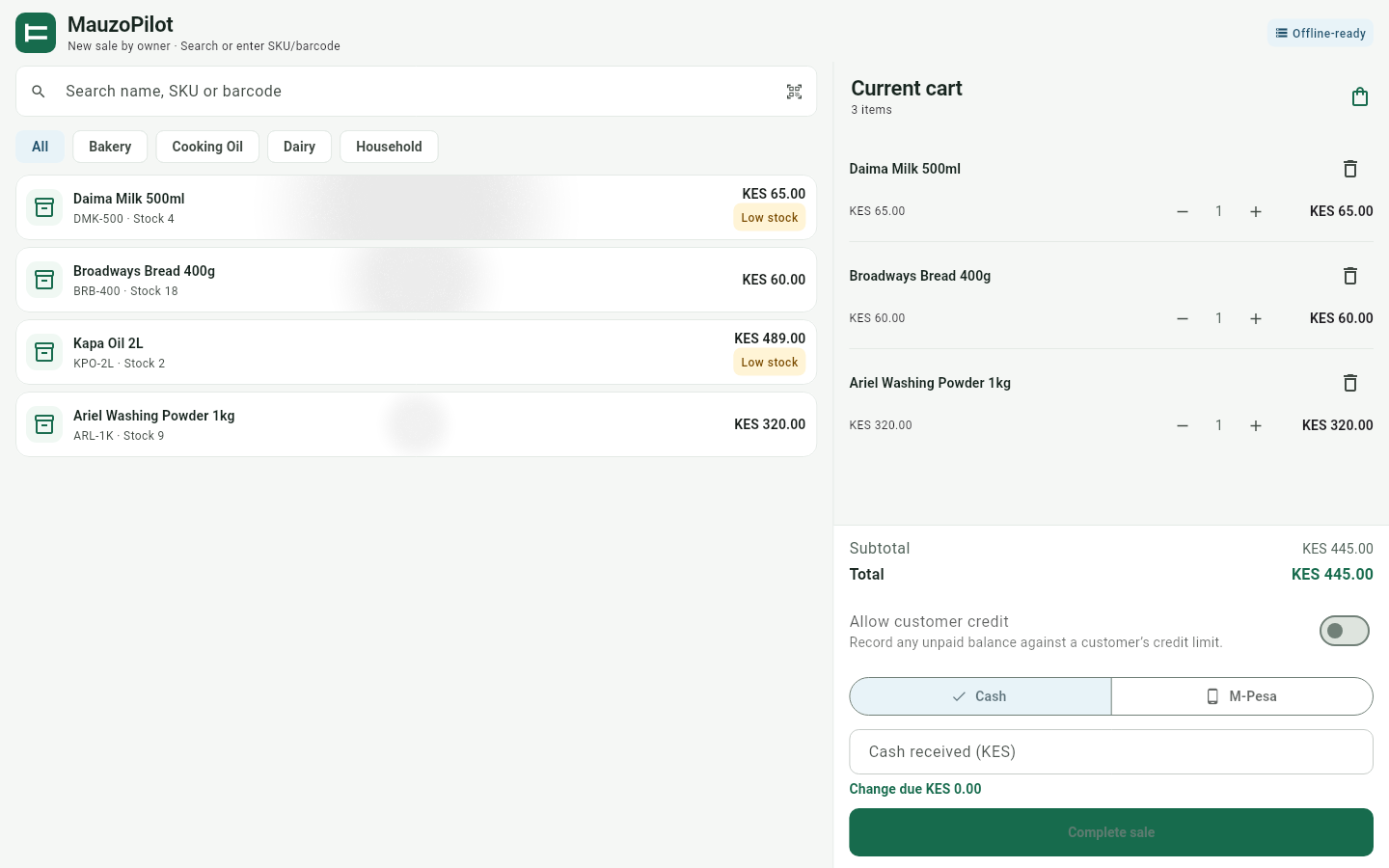
Search by product name, SKU, or scan a barcode, build the cart, and take payment in cash or M-Pesa. Cash sales get automatic change calculation; M-Pesa payments are recorded with the transaction reference and the amount must match before the sale is accepted. Receipts are viewable in-app and copyable to share with the customer.
- Product search by name, SKU, or barcode
- Cash payment with automatic change calculation
- M-Pesa recorded by reference, with the amount verified
- Receipts viewable in-app and copyable — no printer needed
- Sales recorded locally in KES, committed in one transaction
MauzoPilot — Sales & checkout
Stock & products
A catalog and stock count you can actually trust
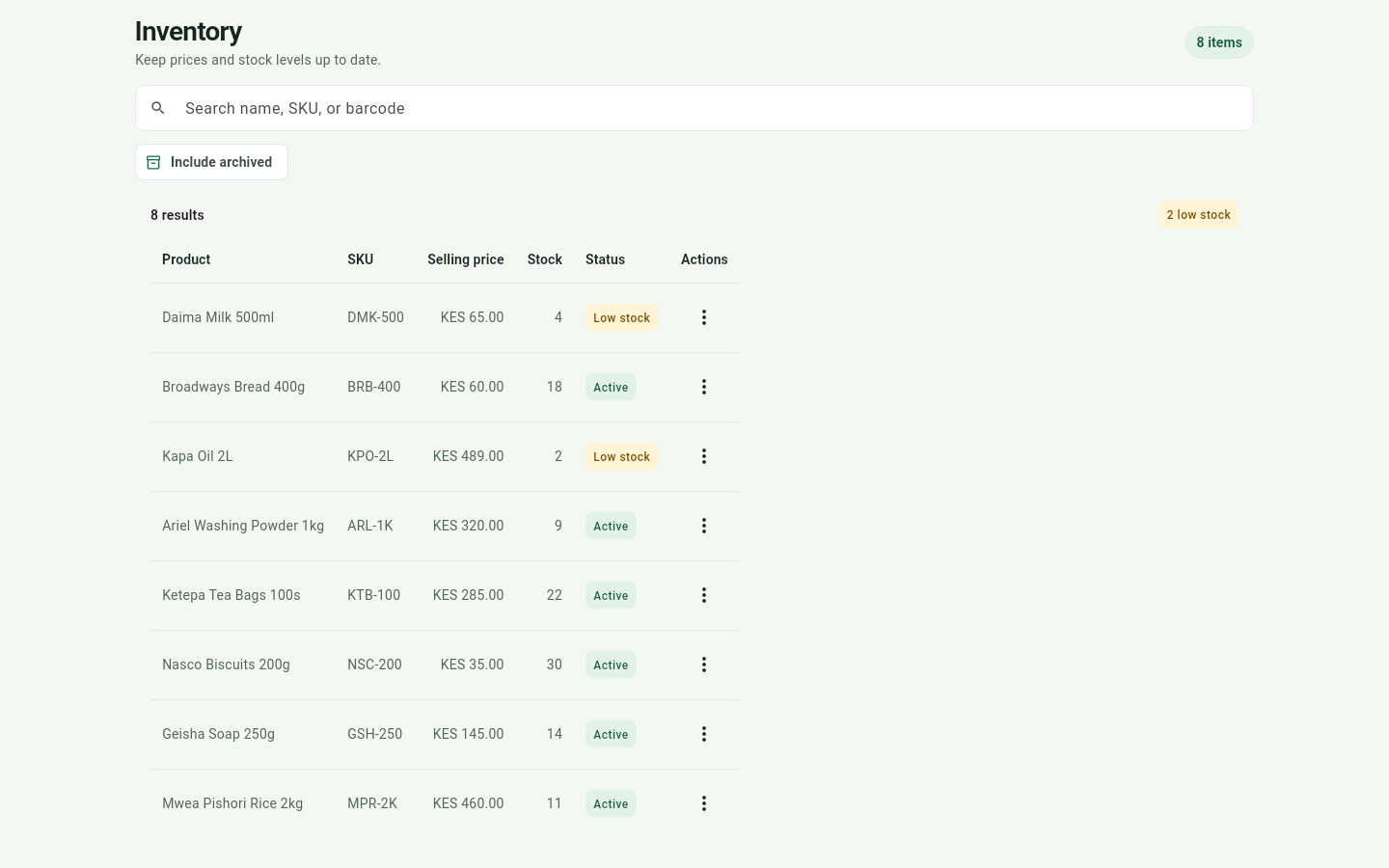
Manage your full product catalog with categories, SKU and barcode fields, cost and selling prices in KES, and current stock quantities. Set a low-stock threshold per product so you know what is running out before it costs a sale. Movements and adjustments carry notes, and physical stocktakes are counted, reviewed, then finalized.
- Categories, SKU/barcode, cost and selling price in KES
- Per-product low-stock thresholds with alerts
- Stock movements and adjustments with notes
- Physical stocktakes with counts and finalization
- Archive products you no longer sell, restore them anytime
MauzoPilot — Stock & products
Expenses, cash & reconciliation
Close each day knowing exactly what should be in the till
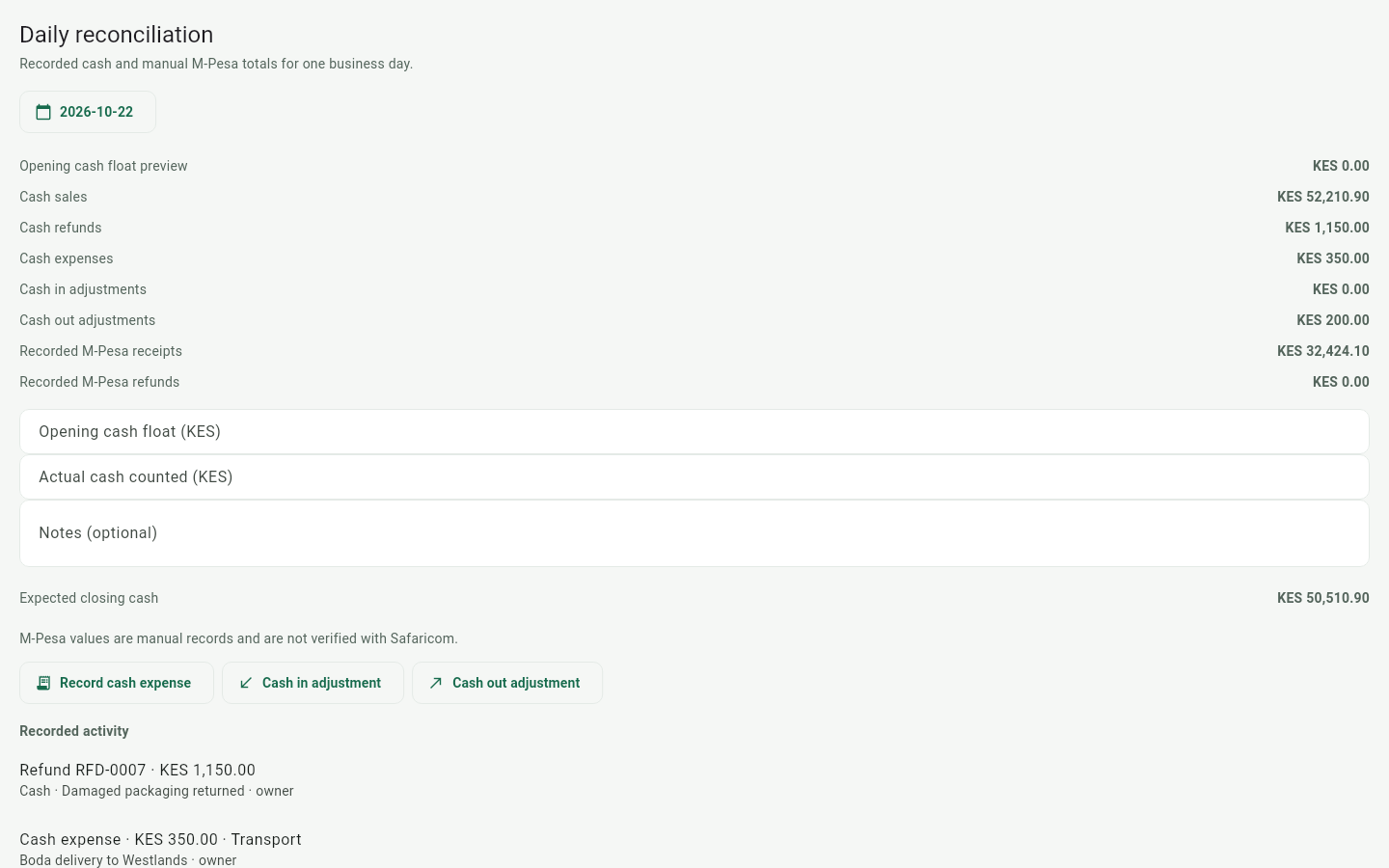
Record business expenses and cash-in/cash-out adjustments as they happen. At day end, reconciliation walks you from the opening float through sales, refunds, and expenses to the counted cash, and shows the variance. M-Pesa receipts and refunds are tracked separately, and a day can only be closed once — so yesterday's numbers stay yesterday's.
- Business expenses recorded with notes
- Cash-in and cash-out adjustments
- Daily reconciliation: opening float, counted cash, variance
- Separate manual M-Pesa receipts and refunds
- A day can only be closed once
MauzoPilot — Expenses, cash & reconciliation
Suppliers & purchasing
Ordering stock without phone calls and exercise books
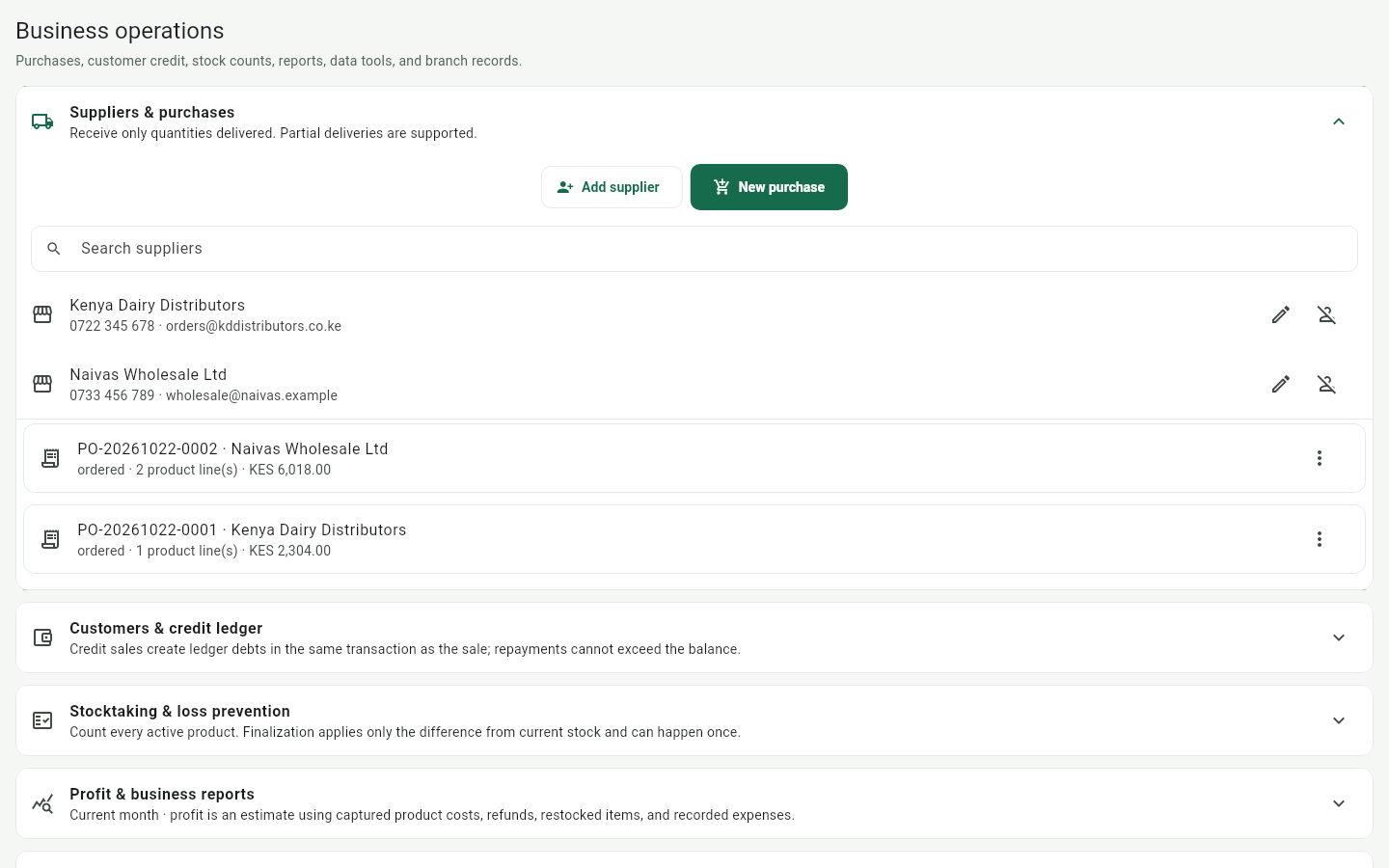
Keep supplier records in the app and raise purchase orders with line items. When stock arrives, receive the order and quantities update; if an order falls through, cancel it and the stock is restored. Your purchasing history stays attached to each supplier.
- Supplier records with contact details
- Purchase orders with line items
- Receive orders to update stock quantities
- Cancel orders and restore stock automatically
MauzoPilot — Suppliers & purchasing
Customer credit
Lend to regulars without losing track of a shilling
Create customer records, record debt when a sale goes unpaid, and log repayments as they come in. Every customer carries a ledger of what they owe and what they have paid back — so the conversation at the counter starts from facts, not memory.
- Customer records managed in the app
- Debt recording against a customer ledger
- Repayments logged as they arrive
- Per-customer ledger of outstanding balances
- Balances and history preserved offline
MauzoPilot — Customer credit
Physical stocktaking
Count shelves, review variances, and finalize with confidence
Physical stock counts shouldn't require messy notebooks and calculator errors. Start a stocktake, count your items shelf-by-shelf, review the difference against recorded stock, and finalize to commit adjustments in one atomic database transaction.
- Guided shelf counting directly in the app
- Automatic variance calculation against catalog numbers
- Draft, review, and finalize workflows
- Atomic stock adjustments committed with audit notes
- Included in Pro plan for regular shop inventory audits
MauzoPilot — Physical stocktaking
Reports & assistant
Answers from your own numbers, even with no connection
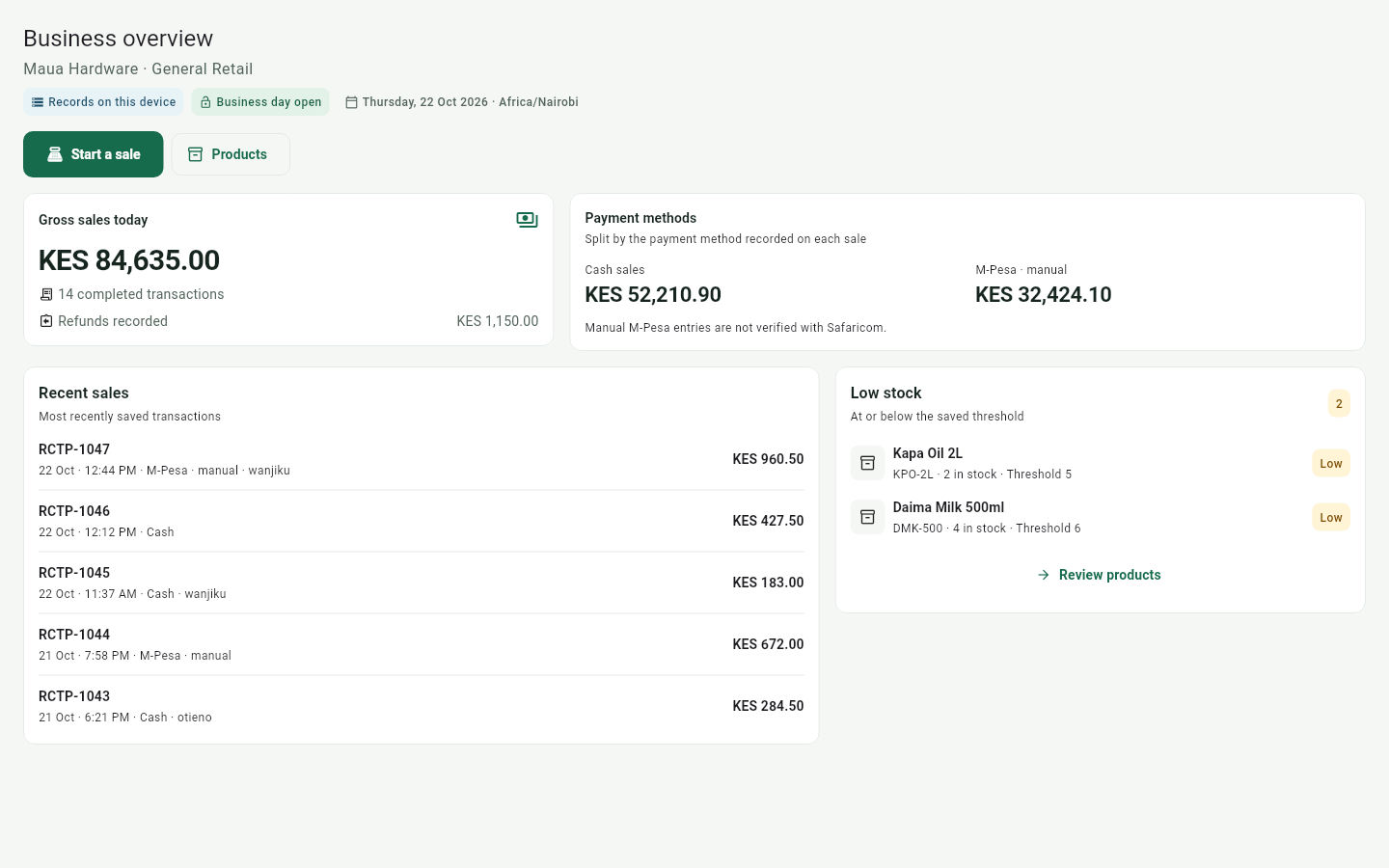
The dashboard shows today's gross sales, the cash-versus-M-Pesa split, refunds, recent sales, and low-stock alerts the moment you open the app. The optional business assistant answers plain questions — sales, low stock, top products, reconciliation — from your own data. It works fully offline with built-in summaries, or you can connect a locally installed Ollama model. Your data never leaves the device.
- Dashboard: today's sales, payment split, refunds, low stock
- Sales history with per-line refunds, never edited after completion
- Offline business assistant with built-in summaries
- Optional connection to a local Ollama model
- Business data stays on the device
MauzoPilot — Reports & assistant
CSV, backup & restore
Your data is yours — move it, back it up, bring it back
Import your existing product list from CSV and export it anytime. One tap creates a database backup file; restore validates the file first and keeps a recovery backup before swapping anything, so a bad file can never leave you worse off than you started.
- CSV import and export for product catalogs
- One-tap offline database backups saved to file
- Restore validates schema (v6) before applying changes
- Automatic recovery backup kept before any file swap
MauzoPilot — CSV, backup & restore
Built for your daily business
Take control of sales, stock and business records
A practical way to manage your shop: sell in KES, keep stock honest, close the till, and understand the day — on Android and Linux, online or off.
Share receipts from the app
Receipts are viewable in-app and copyable to WhatsApp or SMS. A hardware receipt printer is not required.
Optional KRA eTIMS
Ordinary selling does not require KRA. Business and Pro shops can configure optional OSCU eTIMS in the app. Production tax invoicing waits on KRA certification of this integrator.
Sync when you are online
Changes wait in a retrying outbox and go up when connectivity returns. Sync is eventually consistent, not realtime.
Android and Linux apps
Daily operations run in the MauzoPilot apps. This website is for your account, downloads, and support — not a browser till.
Customer credit, not loyalty points
Record debt and repayments against a customer ledger. Points or stamp-card programmes are outside this product.